Wasender 3.7 — Download, Features, Setup & Anti-Ban Tips for WhatsApp Marketing
Complete guide: features, how to download Wasender 3.7 for Windows, step-by-step setup, pricing, safety & alternatives.
Why Businesses Need WhatsApp Bulk Messaging
WhatsApp is one of the fastest channels for customer engagement. Manual messaging becomes unsustainable as you scale, so a reliable Bulk WhatsApp Sender like Wasender 3.7 automates outreach, schedules campaigns, and personalizes messages for better response rates. For small businesses and e-commerce shops, using WhatsApp marketing software saves time and boosts conversions while keeping communication personal.
Overview — What is Wasender 3.7?
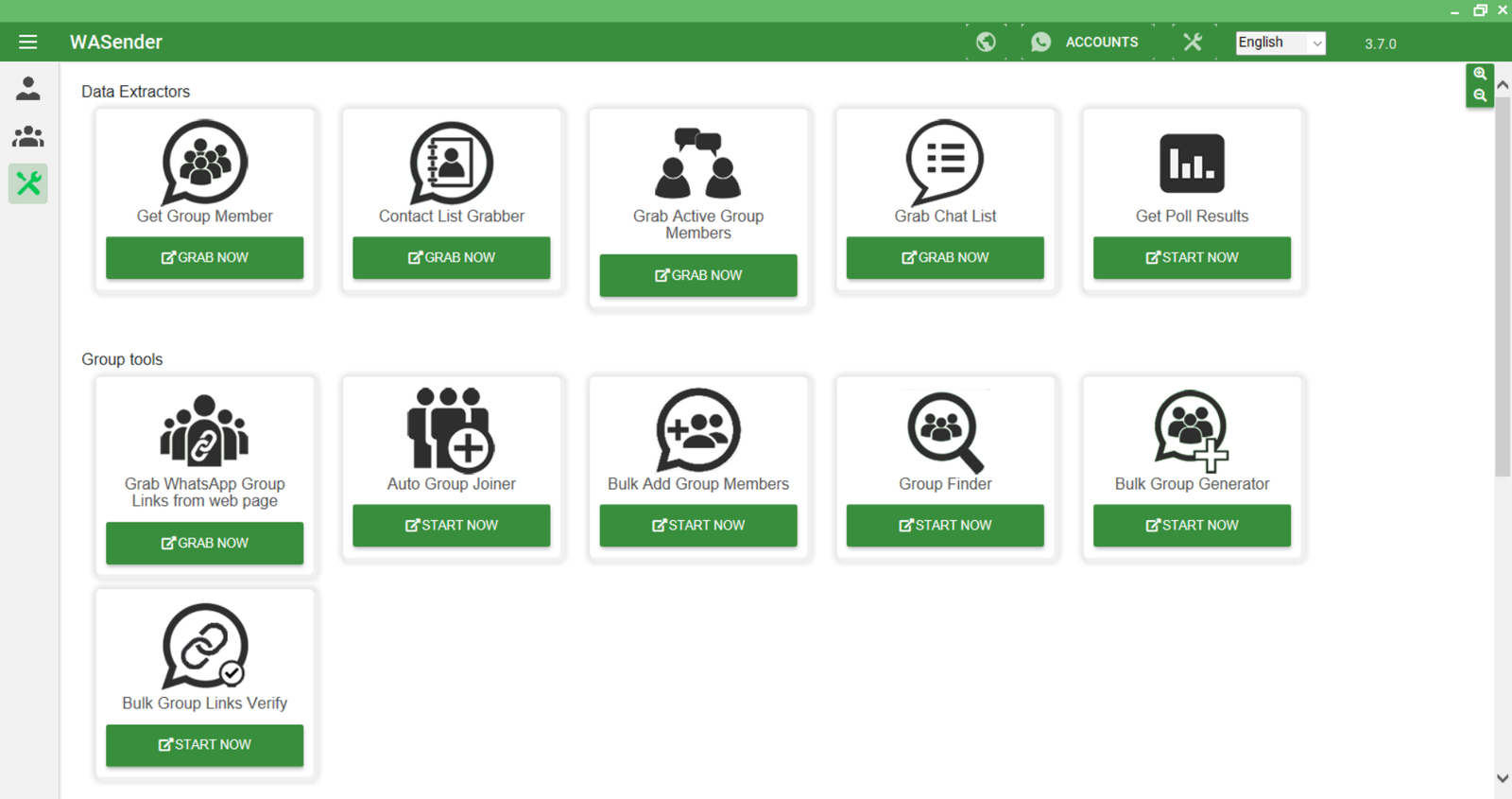
Wasender 3.7 (also referenced as WaSender 3.7.0) is a Windows-based WhatsApp bulk messaging tool used by marketers to send campaigns, automate replies, extract group members, and import contacts via Excel/CSV. It integrates with WhatsApp Web to deliver messages while providing scheduling, personalization variables, and campaign reporting.

Key Features of Wasender 3.7
Wasender 3.7 bundles features that address common WhatsApp marketing needs:
- Bulk WhatsApp Messaging — send large lists of messages quickly.
- Message Personalization — use name variables and custom fields for each contact.
- Schedule Campaigns — plan promotions and automate delivery at optimal times.
- Auto-Reply / Chatbot — set automatic responses to common queries.
- Contact Extraction — extract group members and use Google Maps data extractor workflows for local leads.
- Excel/CSV Import & Export — manage lists easily and import bulk contacts.
- Media Support — send images, videos, PDFs and attachments with messages.
- Analytics & Reports — view delivery and reply rates for campaigns.
How to Download & Install Wasender 3.7 (Windows)
Follow these steps to download and install Wasender 3.7 safely:
- Visit the official seller or an authorized reseller — avoid cracked downloads.
- Download the Wasender 3.7 Windows installer (offline installer recommended).
- Run the installer and follow on-screen prompts; ensure system requirements are met.
- Open Wasender and connect via WhatsApp Web by scanning the QR code.
- Activate your license (one-year / lifetime options) using the provided license key.
Tip: Always keep Wasender updated to get the latest anti-ban and security fixes.
Step-by-Step Tutorial: Send Your First Campaign
Quick setup to send your first campaign with Wasender 3.7:
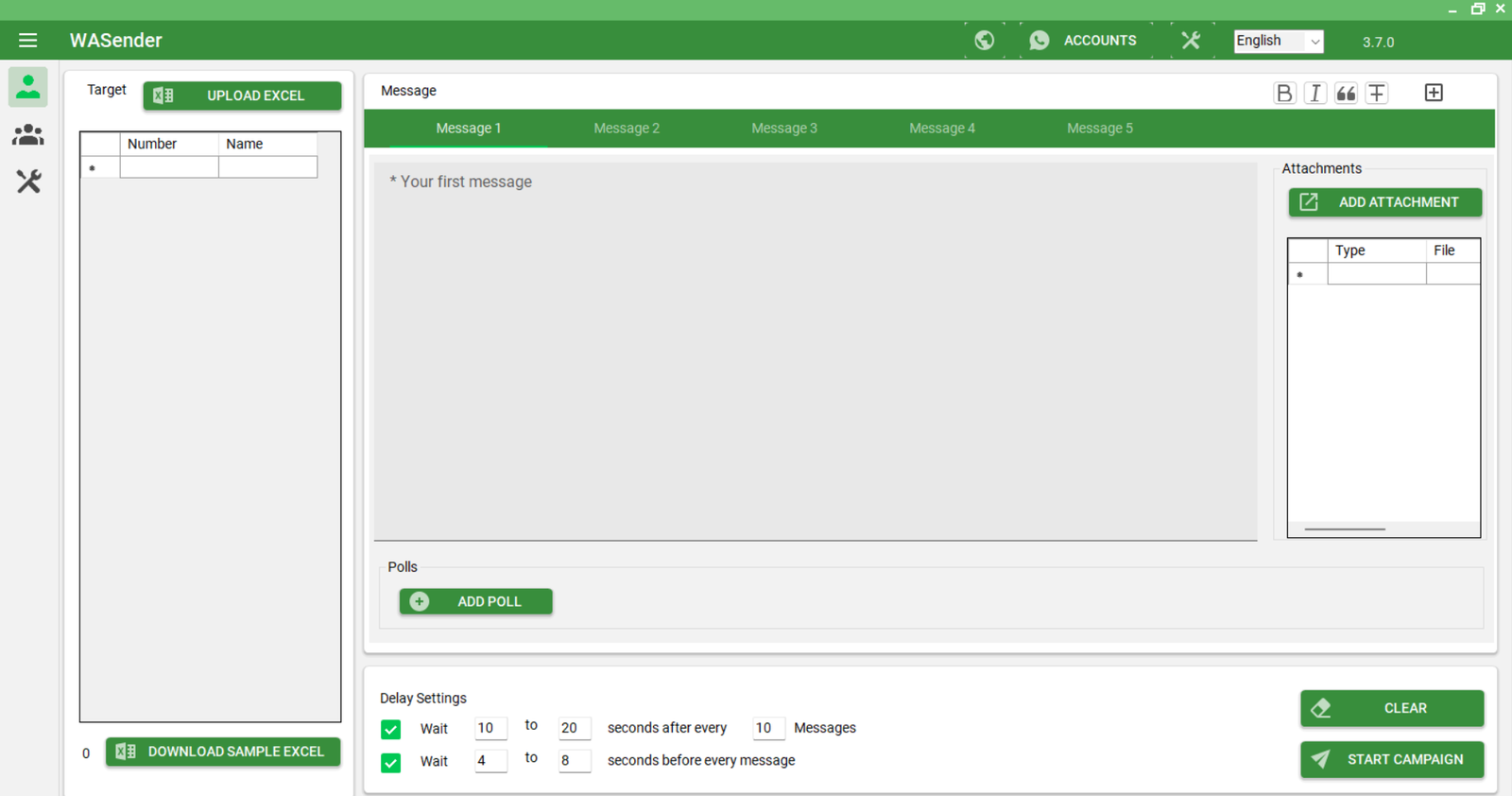
- Import contacts: upload an Excel/CSV file with contacts (ensure international format + country codes).
- Create message: write your message and use personalization tokens like
{{Name}}. - Attach media: add images or PDFs if needed—choose “send as media” for richer messages.
- Set delays: enable message delay management to mimic human sending patterns.
- Schedule or send: schedule the campaign or send immediately and monitor delivery reports.
Pro Tips: Anti-Ban Settings & Best Practices
Bulk messaging carries risk. Use these Wasender 3.7 anti ban settings and best practices to reduce the chance of account suspension:
- Start slowly: warm up new accounts with small daily sends before scaling up.
- Use randomized delays and message intervals (message delay management) to appear human-like.
- Avoid identical messages to large lists—personalize content and vary templates.
- Respect opt-outs and never message numbers that requested no contact.
- Prefer official integrations where possible; avoid shady or cracked versions that compromise safety.
Wasender 3.7 vs Competitors
Short comparison—what Wasender 3.7 offers vs other common approaches:
| Capability | Wasender 3.7 | Other Tools / Manual WhatsApp |
|---|---|---|
| Bulk Messaging | ✅ Yes — desktop bulk sender | ⚠️ Limited / ❌ Manual |
| Scheduling | ✅ Built-in | ❌ Not available |
| Auto-Reply | ✅ Yes (bot features) | ⚠️ Depends on tool |
| Analytics | ✅ Advanced reports | ❌ Rare or Basic |
Pricing & License Options
Wasender typically offers flexible licensing: trial/demo versions, yearly subscriptions and lifetime licenses. Pricing varies by seller and included features (multi-account support, advanced analytics). Always purchase from official channels or authorized resellers to ensure updates and support.
Is Wasender 3.7 Legal & Safe to Use?
Wasender 3.7 uses WhatsApp Web integration to send messages, which is safer than unofficial APIs. However, it is crucial to follow WhatsApp's terms and local regulations: get consent, avoid spam, and honor user privacy. Using cracked software or ignoring best practices can result in account suspension or legal issues.
Real Business Use Cases
- Local lead generation: use Google Maps contact extractor to find nearby prospects and run targeted campaigns.
- E-commerce promotions: send product launch alerts, discount codes, and order updates.
- Customer support: automate common replies and route complex queries to agents.
Frequently Asked Questions (FAQ)
Can I download Wasender 3.7 for Windows?
Yes — Wasender 3.7 has a Windows installer. Always download from official sources or authorized resellers to ensure you get updates and support.
How do I avoid getting my WhatsApp account banned?
Warm up accounts, use randomized delays, personalize messages, and follow opt-out requests. Don’t use cracked tools or mass identical messages.
Does Wasender support Excel/CSV imports?
Yes. Wasender 3.7 supports bulk import from Excel/CSV, making contact management and campaign setup easy.
